CriticalPathTraining
http://www.sharepoint-videos.com/
http://www.ba-insight.net/Pages/Home.aspx
Thursday, April 22, 2010


Wednesday, April 7, 2010
Workflow - Failed on Start error.
I have a practice of changing the default class name of workflow1.cs to some logical name.cs based on the workflow i create. I created the workflow deployed it - however when I run the workflow - i get "Failed on start".
I even tried to debug the same but breakpoint never came.
I made a silly mistake in workflow.xml.I forgot to change the class name
CodeBesideClass="Namespace.Workflow1"
Resolution: Just change the Workflow1.cs to your classname and done....;))
CodeBesideClass="Namespace.CustomWorkflowClassName"
I even tried to debug the same but breakpoint never came.
I made a silly mistake in workflow.xml.I forgot to change the class name
CodeBesideClass="Namespace.Workflow1"
Resolution: Just change the Workflow1.cs to your classname and done....;))
CodeBesideClass="Namespace.CustomWorkflowClassName"
Tuesday, April 6, 2010
Hide Fields from NewForm.aspx and DispForm.aspx
1. Go to NewForm.aspx page
2. Add &ToolPaneView=2 to end of url
"http://testintranet.myworld.com/sites/devtesting/Lists/TtSW%20Management/NewForm.aspx?RootFolder=%2Fsites%2Fdevtesting%2FLists%2FTtSW%20Management&Source=http%3A%2F%2Ftestintranet%2Esysmex%2Ecom%2Fsites%2Fdevtesting%2FLists%2FTtSW%2520Management%2FAllItems%2Easpx%3FSortField%3DTtSW%255fx0020%255fItem%255fx0020%255fStatus%26SortDir%3DAsc%26View%3D%257bD4C05374%252d8AD7%252d4A65%252d972F%252dA866D1CB9EA4%257d&ToolPaneView=2"
3. Drag a content editor webpart
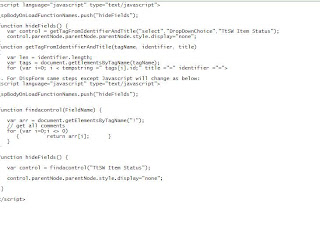
4. Add the below Javascript for NewForm.aspx
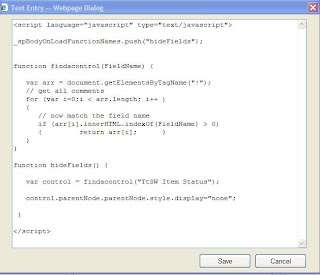
5. Add the below script for EditPage
6. AllDone - Enjoi
Reference Links
http://www.cleverworkarounds.com/2008/02/07/more-sharepoint-branding-customisation-using-javascript-part-1/
http://blogs.msdn.com/sharepointdesigner/archive/2007/06/13/using-javascript-to-manipulate-a-list-form-field.aspx
http://kwizcom.blogspot.com/2007/08/managing-field-control-visibility-way.html
http://akanoongo.blogspot.com/2008/04/how-to-hide-fields-in-sharepoint-list.html
2. Add &ToolPaneView=2 to end of url
"http://testintranet.myworld.com/sites/devtesting/Lists/TtSW%20Management/NewForm.aspx?RootFolder=%2Fsites%2Fdevtesting%2FLists%2FTtSW%20Management&Source=http%3A%2F%2Ftestintranet%2Esysmex%2Ecom%2Fsites%2Fdevtesting%2FLists%2FTtSW%2520Management%2FAllItems%2Easpx%3FSortField%3DTtSW%255fx0020%255fItem%255fx0020%255fStatus%26SortDir%3DAsc%26View%3D%257bD4C05374%252d8AD7%252d4A65%252d972F%252dA866D1CB9EA4%257d&ToolPaneView=2"
3. Drag a content editor webpart
4. Add the below Javascript for NewForm.aspx

5. Add the below script for EditPage

6. AllDone - Enjoi
Reference Links
http://www.cleverworkarounds.com/2008/02/07/more-sharepoint-branding-customisation-using-javascript-part-1/
http://blogs.msdn.com/sharepointdesigner/archive/2007/06/13/using-javascript-to-manipulate-a-list-form-field.aspx
http://kwizcom.blogspot.com/2007/08/managing-field-control-visibility-way.html
http://akanoongo.blogspot.com/2008/04/how-to-hide-fields-in-sharepoint-list.html
Tuesday, March 23, 2010
cannot-restore-from-recycle-bin-nested-folders
A user accidentally cancelled on While moving the documents thru explorer view. All of her documents from parent location were gone.
When I tried to restore it gave error that - The item <> cannot be restored.
Then I came across the blog which saved an hours of effort of restoring the mOSS 2007 site and restoring the document library.
We created exactly same folder structure in the docment library and did the restore from recycle bin - BINGO it worked;))
The below blog saved us...http://www.cleverworkarounds.com/2009/04/14/cannot-restore-from-recycle-bin-nested-folders/
When I tried to restore it gave error that - The item <> cannot be restored.
Then I came across the blog which saved an hours of effort of restoring the mOSS 2007 site and restoring the document library.
We created exactly same folder structure in the docment library and did the restore from recycle bin - BINGO it worked;))
The below blog saved us...http://www.cleverworkarounds.com/2009/04/14/cannot-restore-from-recycle-bin-nested-folders/
Monday, March 8, 2010
Sharepoint 2010 Videos
http://www.sharepoint-videos.com/free-sharepoint-sharepoint-designer-and-infopath-2010-videos/
Thursday, March 4, 2010
SharePoint Designer 2010: Workflow Features
http://furuknap.blogspot.com/2009/07/sharepoint-designer-2010-workflow.html
Ten Things You Need to Know About SharePoint Server 2010
1. Previous versions of Microsoft Office are supported.
2. Via the new Office 2010 Backstage user interface, you can access and search tags and notes used in documents.
3. Office Web apps embedded in SharePoint sites let you edit Office content from a browser.
4. The personal My Site feature includes a Silverlight-based organization browser.
5. Libraries should scale to tens of millions items – and archives to hundreds of millions documents.
6. Document Sets let you manage content using a single workflow or metadata, thus better addressing governance and records management.
7. Identity management improvements include faster updates between SharePoint and directory services, including LDAP servers and third-party applications.
8. New SharePoint APIs include those for AJAX, Silverlight, and Language-Integrated Query (LINQ).
9. There's far superior disaster recovery, including new backup and restore functions.
10. A SharePoint version specific for Internet sites will be available when the product ships next year.
2. Via the new Office 2010 Backstage user interface, you can access and search tags and notes used in documents.
3. Office Web apps embedded in SharePoint sites let you edit Office content from a browser.
4. The personal My Site feature includes a Silverlight-based organization browser.
5. Libraries should scale to tens of millions items – and archives to hundreds of millions documents.
6. Document Sets let you manage content using a single workflow or metadata, thus better addressing governance and records management.
7. Identity management improvements include faster updates between SharePoint and directory services, including LDAP servers and third-party applications.
8. New SharePoint APIs include those for AJAX, Silverlight, and Language-Integrated Query (LINQ).
9. There's far superior disaster recovery, including new backup and restore functions.
10. A SharePoint version specific for Internet sites will be available when the product ships next year.
Subscribe to:
Posts (Atom)