Thursday, July 22, 2010
recurrence-not-showing-on-calendar-list
http://www.sharepointdev.net/sharepoint--development-programming/recurrence-not-showing-on-calendar-list-43190.shtml


Add new item in Sharepoint Calendar Programmatically.
I used the below code to add new item in sharepoint calendar. Initially the item used to come in AllEvents view ONLY. It was not getting displayed in Calendar view. I just changed Event Type =0 and it worked....Below is the working code which will show item in calendar view too.
SPWeb site = new SPSite("http://moss-ocs:8096/doccenters/IS").OpenWeb();
SPList cal = site.Lists["Calendar"];
SPListItem calEvent = cal.Items.Add();
calEvent["Title"] = "Training19";
//string recurrence = "" +
//"su " +
//"
//"2010-09-20T09:00:00Z " +
//"
//calEvent["RecurrenceData"] = recurrence;
calEvent["EventType"] = 0;
calEvent["EventDate"] = new DateTime(2010, 7, 29, 8, 0, 0);
calEvent["EndDate"] = new DateTime(2010, 7, 30, 9, 0, 0);
calEvent["UID"] = System.Guid.NewGuid();
calEvent["TimeZone"] = 13;
calEvent["Description"] = "";
calEvent["fAllDayEvent"] = 0;
calEvent["fRecurrence"] = 0;
calEvent.Update();
cal.Update();
SPWeb site = new SPSite("http://moss-ocs:8096/doccenters/IS").OpenWeb();
SPList cal = site.Lists["Calendar"];
SPListItem calEvent = cal.Items.Add();
calEvent["Title"] = "Training19";
//string recurrence = "
//"
//"
//"
//"
//calEvent["RecurrenceData"] = recurrence;
calEvent["EventType"] = 0;
calEvent["EventDate"] = new DateTime(2010, 7, 29, 8, 0, 0);
calEvent["EndDate"] = new DateTime(2010, 7, 30, 9, 0, 0);
calEvent["UID"] = System.Guid.NewGuid();
calEvent["TimeZone"] = 13;
calEvent["Description"] = "";
calEvent["fAllDayEvent"] = 0;
calEvent["fRecurrence"] = 0;
calEvent.Update();
cal.Update();
Friday, May 14, 2010
Custom webpart Page template in Moss 2007
CUSTOM WEB PART PAGE (only appears in a document library?)
"C:\Program Files\Common Files\Microsoft Shared\web server extensions\12\TEMPLATE\1033\STS\DOCTEMP\SMARTPGS"
copy spstd1.aspx and save it as "custom1.aspx"
(note later you may modify it to actually change the template layout)
( Note : "_layouts\images" folder maps to "C:\Program Files\Common Files\Microsoft Shared\Web Server Extensions\12\template\images" in IIS).
C:\Program Files\Common Files\Microsoft Shared\web server extensions\12\TEMPLATE\LAYOUTS\1033\IMAGES
so in ..\12\template\images copy spstd1.gif and rename it 'custom1.gif'
(this is just a little picture to show the user a preview of the template)
CREATING A CUSTOM SPCF ASPX PAGE (ONLY NEEDED ONCE, BUT MODIFIED FOR EACH NEW TEMPLATE)
spcf.aspx page makes use of "OWSSVR.DLL" it's shielded and thus the functionality can't be altered
MS have removed their content explaining how to do this (along with the custspcf.aspx template)
I have downloaded something similar from here:
http://www.dontpapanic.com/download/custspcf.aspx.txt
we now have custspcf.aspx in C:\Program Files\Common Files\Microsoft Shared\web server extensions\12\TEMPLATE\LAYOUTS
edit it with the following instructions
Additionally google has cached the original instructions
http://74.125.77.132/search?q=cache:LSPN4h6AEF0J:msdn.microsoft.com/en-us/library/ms916835.aspx+http://msdn.microsoft.com/en-us/library/ms916835.aspx&cd=1&hl=en&ct=clnk&client=firefox-a
ONLY ONCE! NEXT, REFERENCE OUR NEW custspcf.aspx...
open the "create.aspx" page from "_layouts" folder. Search for the code
Search for...
It may look like...
" runat="server">
This is just an HTML table so, we just want to add a link below,
Custom Web Part Page
To be pretty, insert the following code between the "Basic" page and the "Web Part Page"
','

Custom Web Part Page
references: http://kittyandbear.net/john/research/wss-3-custom-page-template.txt
"C:\Program Files\Common Files\Microsoft Shared\web server extensions\12\TEMPLATE\1033\STS\DOCTEMP\SMARTPGS"
copy spstd1.aspx and save it as "custom1.aspx"
(note later you may modify it to actually change the template layout)
( Note : "_layouts\images" folder maps to "C:\Program Files\Common Files\Microsoft Shared\Web Server Extensions\12\template\images" in IIS).
C:\Program Files\Common Files\Microsoft Shared\web server extensions\12\TEMPLATE\LAYOUTS\1033\IMAGES
so in ..\12\template\images copy spstd1.gif and rename it 'custom1.gif'
(this is just a little picture to show the user a preview of the template)
CREATING A CUSTOM SPCF ASPX PAGE (ONLY NEEDED ONCE, BUT MODIFIED FOR EACH NEW TEMPLATE)
spcf.aspx page makes use of "OWSSVR.DLL" it's shielded and thus the functionality can't be altered
MS have removed their content explaining how to do this (along with the custspcf.aspx template)
I have downloaded something similar from here:
http://www.dontpapanic.com/download/custspcf.aspx.txt
we now have custspcf.aspx in C:\Program Files\Common Files\Microsoft Shared\web server extensions\12\TEMPLATE\LAYOUTS
edit it with the following instructions
Additionally google has cached the original instructions
http://74.125.77.132/search?q=cache:LSPN4h6AEF0J:msdn.microsoft.com/en-us/library/ms916835.aspx+http://msdn.microsoft.com/en-us/library/ms916835.aspx&cd=1&hl=en&ct=clnk&client=firefox-a
ONLY ONCE! NEXT, REFERENCE OUR NEW custspcf.aspx...
open the "create.aspx" page from "_layouts" folder. Search for the code
Search for...
It may look like...
This is just an HTML table so, we just want to add a link below,
Custom Web Part Page
To be pretty, insert the following code between the "Basic" page and the "Web Part Page"
Custom Web Part Page
references: http://kittyandbear.net/john/research/wss-3-custom-page-template.txt
Thursday, April 22, 2010
Free Sharepoint 2010 Webcast Sites
CriticalPathTraining
http://www.sharepoint-videos.com/
http://www.ba-insight.net/Pages/Home.aspx
http://www.sharepoint-videos.com/
http://www.ba-insight.net/Pages/Home.aspx
Wednesday, April 7, 2010
Workflow - Failed on Start error.
I have a practice of changing the default class name of workflow1.cs to some logical name.cs based on the workflow i create. I created the workflow deployed it - however when I run the workflow - i get "Failed on start".
I even tried to debug the same but breakpoint never came.
I made a silly mistake in workflow.xml.I forgot to change the class name
CodeBesideClass="Namespace.Workflow1"
Resolution: Just change the Workflow1.cs to your classname and done....;))
CodeBesideClass="Namespace.CustomWorkflowClassName"
I even tried to debug the same but breakpoint never came.
I made a silly mistake in workflow.xml.I forgot to change the class name
CodeBesideClass="Namespace.Workflow1"
Resolution: Just change the Workflow1.cs to your classname and done....;))
CodeBesideClass="Namespace.CustomWorkflowClassName"
Tuesday, April 6, 2010
Hide Fields from NewForm.aspx and DispForm.aspx
1. Go to NewForm.aspx page
2. Add &ToolPaneView=2 to end of url
"http://testintranet.myworld.com/sites/devtesting/Lists/TtSW%20Management/NewForm.aspx?RootFolder=%2Fsites%2Fdevtesting%2FLists%2FTtSW%20Management&Source=http%3A%2F%2Ftestintranet%2Esysmex%2Ecom%2Fsites%2Fdevtesting%2FLists%2FTtSW%2520Management%2FAllItems%2Easpx%3FSortField%3DTtSW%255fx0020%255fItem%255fx0020%255fStatus%26SortDir%3DAsc%26View%3D%257bD4C05374%252d8AD7%252d4A65%252d972F%252dA866D1CB9EA4%257d&ToolPaneView=2"
3. Drag a content editor webpart
4. Add the below Javascript for NewForm.aspx
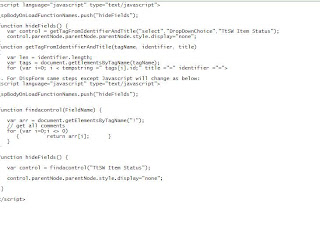
5. Add the below script for EditPage
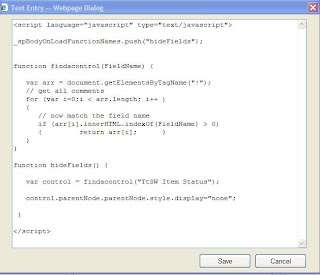
6. AllDone - Enjoi
Reference Links
http://www.cleverworkarounds.com/2008/02/07/more-sharepoint-branding-customisation-using-javascript-part-1/
http://blogs.msdn.com/sharepointdesigner/archive/2007/06/13/using-javascript-to-manipulate-a-list-form-field.aspx
http://kwizcom.blogspot.com/2007/08/managing-field-control-visibility-way.html
http://akanoongo.blogspot.com/2008/04/how-to-hide-fields-in-sharepoint-list.html
2. Add &ToolPaneView=2 to end of url
"http://testintranet.myworld.com/sites/devtesting/Lists/TtSW%20Management/NewForm.aspx?RootFolder=%2Fsites%2Fdevtesting%2FLists%2FTtSW%20Management&Source=http%3A%2F%2Ftestintranet%2Esysmex%2Ecom%2Fsites%2Fdevtesting%2FLists%2FTtSW%2520Management%2FAllItems%2Easpx%3FSortField%3DTtSW%255fx0020%255fItem%255fx0020%255fStatus%26SortDir%3DAsc%26View%3D%257bD4C05374%252d8AD7%252d4A65%252d972F%252dA866D1CB9EA4%257d&ToolPaneView=2"
3. Drag a content editor webpart
4. Add the below Javascript for NewForm.aspx

5. Add the below script for EditPage

6. AllDone - Enjoi
Reference Links
http://www.cleverworkarounds.com/2008/02/07/more-sharepoint-branding-customisation-using-javascript-part-1/
http://blogs.msdn.com/sharepointdesigner/archive/2007/06/13/using-javascript-to-manipulate-a-list-form-field.aspx
http://kwizcom.blogspot.com/2007/08/managing-field-control-visibility-way.html
http://akanoongo.blogspot.com/2008/04/how-to-hide-fields-in-sharepoint-list.html
Tuesday, March 23, 2010
cannot-restore-from-recycle-bin-nested-folders
A user accidentally cancelled on While moving the documents thru explorer view. All of her documents from parent location were gone.
When I tried to restore it gave error that - The item <> cannot be restored.
Then I came across the blog which saved an hours of effort of restoring the mOSS 2007 site and restoring the document library.
We created exactly same folder structure in the docment library and did the restore from recycle bin - BINGO it worked;))
The below blog saved us...http://www.cleverworkarounds.com/2009/04/14/cannot-restore-from-recycle-bin-nested-folders/
When I tried to restore it gave error that - The item <> cannot be restored.
Then I came across the blog which saved an hours of effort of restoring the mOSS 2007 site and restoring the document library.
We created exactly same folder structure in the docment library and did the restore from recycle bin - BINGO it worked;))
The below blog saved us...http://www.cleverworkarounds.com/2009/04/14/cannot-restore-from-recycle-bin-nested-folders/
Subscribe to:
Posts (Atom)